
We rebuilt how we optimise WordPress sites using our own AI-driven system, no extra plugins required. Here are the real Google scores, with screenshots.
Most websites are quietly underperforming and their owners have no idea. Not broken, not obviously bad. Just slow enough that visitors leave, unreadable enough that some people cannot use the site at all, and untidy enough underneath that Google struggles to make sense of it. You never see any of that happening. You only see that the enquiries are not coming in.
We wanted to know how far a normal small business website could actually be pushed. Not a stripped-back landing page built to game a test, but a real site with real images, real content and a real client behind it. So we ran the experiment across a handful of the sites we look after, and the results surprised even us.
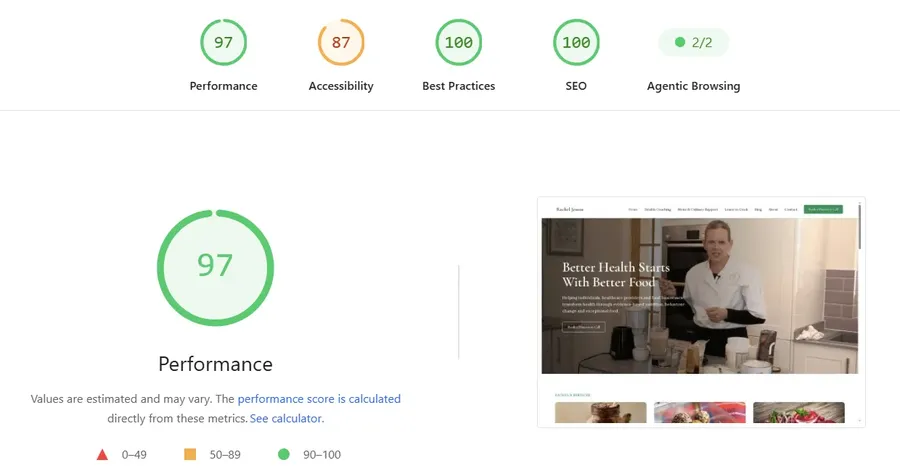
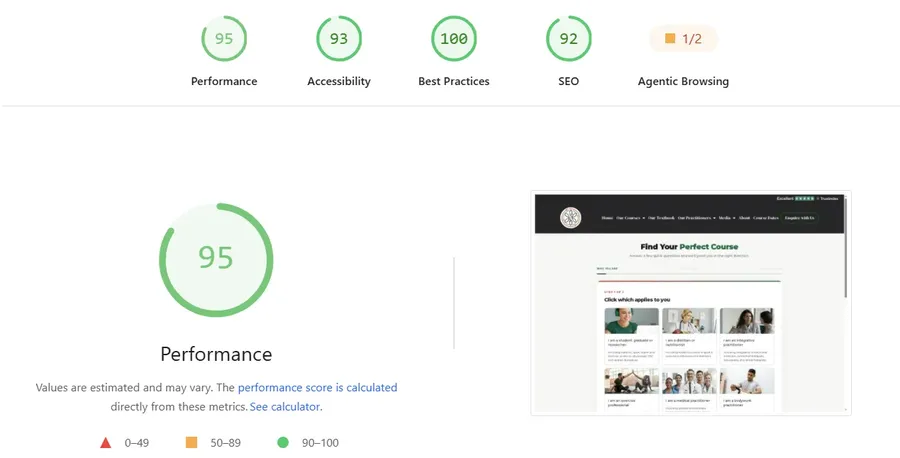
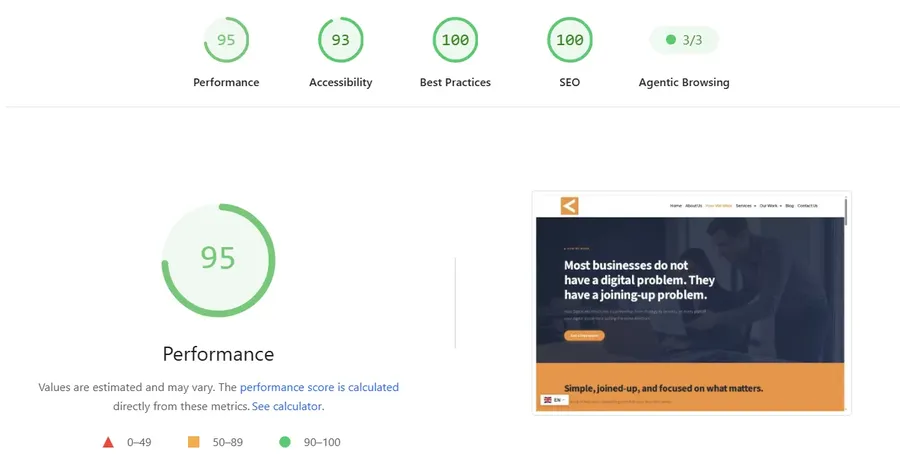
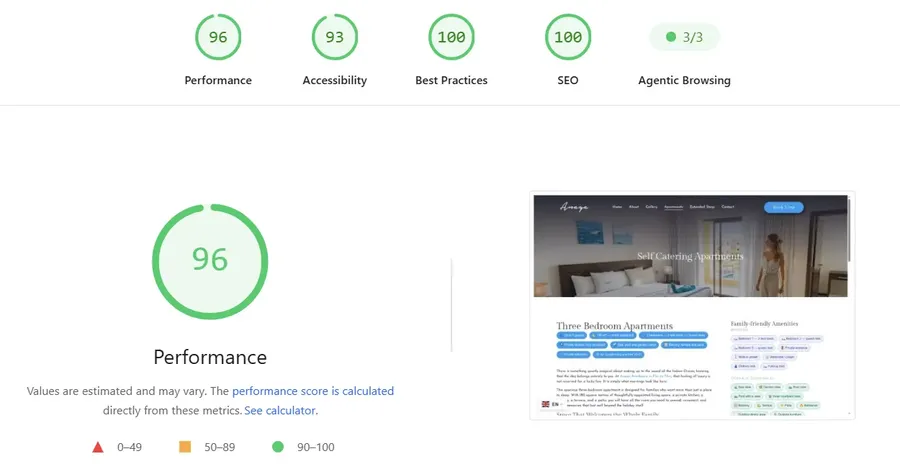
Google's own PageSpeed Insights tool grades a website on several separate things, not just speed. Performance is how fast it loads. Accessibility is whether people with impaired sight, hearing or motor control can actually use it. Best practices covers whether the site is built safely and correctly. SEO checks whether search engines can properly read and index it. Agentic Browsing checks how well AI tools and assistants can read and use the site. Each is scored out of one hundred (Agentic Browsing is scored out of 3).
All four sites were tested on mobile, which is the harder of the two tests, most recently on 27 August 2026. The screenshots are below so you can see them for yourself. We are not asking you to take our word for it.
Now, the interesting part is not the numbers. It is how we got them, and why almost nobody else is doing it this way.
The usual approach is to install more plugins. A caching plugin for speed, an image optimiser, something for SEO, something else for accessibility. Each one helps a little, and each one adds weight, another update to manage, another thing that can conflict with your theme.
Most small business sites we inherit are carrying twenty or thirty plugins, and a good number of those were installed to fix a problem the previous plugin created. The site improves for a week, then something updates, something breaks, and you are back where you started. Meanwhile every one of those plugins is another door into your website that somebody has to keep locked, which is exactly what the best practices score is measuring.
We went the other direction. Instead of adding tools to the site, we built our own system that connects to it from the outside, does the work, and leaves nothing behind. No permanent extra plugin. No third party service holding your data. It runs the checks, makes the fixes, and gets out of the way.
They pull in different directions, and it is worth being clear about what each one buys you.
Visitors abandon pages that take too long, and every second of delay loses a share of the people who were interested enough to click. Those are the warmest leads you will ever get, and they leave before they see anything you offer.
Roughly one in six people worldwide lives with some form of disability. If your site does not work for them, you are turning away customers for no reason. In a growing number of countries it is also a legal exposure, not merely good manners.
Best practices covers whether your site is served securely and built without known risks. Nobody notices it until something goes wrong, and then it is the only thing anybody cares about.
A clean SEO score does not put you at the top of Google on its own, but a poor one actively holds you back, and fixing it makes every other bit of marketing you do work harder.
This is the part most tools will not touch, and it matters because a great many small business sites are built with Elementor.
Elementor produces beautiful pages. It also produces a lot of extra code underneath, and it stores your page layouts in a format that ordinary optimisation tools cannot safely read. So those tools do one of two things. They ignore Elementor entirely, which means your biggest source of bloat goes untouched. Or they try to fix it anyway and break your layout, which is worse.
That single distinction accounts for a large share of the improvement in the scores above.
No. WordPress is where most of our clients are, and Elementor is where the hardest problems live, which is why we have led with it here. But the four scores Google gives you have nothing to do with what your site was built in. We do the same work on hand-built HTML and CSS sites, on JavaScript-driven sites and on other content management systems. The audit is the same, the categories are the same, and the fixes follow the same logic. If you are not sure what your site was built with, that is fine. Send us the address and we will tell you.
There is a newer consideration on top of all this. People increasingly ask ChatGPT, Claude, Gemini or Google's AI summaries for recommendations instead of scrolling a results page. Those systems favour sites that are well structured, fast to read and clearly organised.
The same work that lifts your four scores also makes your site easier for an AI to understand and cite. That is not a coincidence. They are reading the same signals, and that is going to matter more every year. Read more in our guide to AI search visibility in Mauritius.
Increase in the probability a mobile visitor leaves, compared to a 1-second load.
| Load time | Increase in bounce probability |
|---|---|
| 3 seconds | +32% |
| 5 seconds | +90% |
| 6 seconds | +106% |
| 10 seconds | +123% |
Source: Google/SOASTA Research, 2017 (via Think with Google).
If your site is on WordPress, and particularly if it was built with Elementor, there is a strong chance it is carrying weight it does not need and losing marks it does not have to lose.
A word of caution, because we would rather be straight with you than oversell. Not every site can reach the numbers above. A heavy online store with hundreds of products and live stock feeds has more to carry than a brochure site, and it will not score the same. What we can tell you is that almost every site we have looked at had significant room to improve across at least two of the four categories, and that the improvement showed up in the analytics afterwards.
We use AI tooling throughout, which is what lets us do in an afternoon what used to take a week of manual work. That is the practical benefit to you: the same care and attention, at a cost that makes sense for a small business.
Digital.mu has spent over twenty years building websites and web applications for businesses across several countries. Hundreds of sites over that period, and around thirty clients currently under active management across South Africa, Mauritius, the United Kingdom and the United Arab Emirates. The business operates from Mauritius and works with clients wherever they are.
It's Google's own tool that grades a website on four separate things: performance (load speed), accessibility, best practices (security and safe coding) and SEO (whether search engines can read the site properly). Each category is scored out of one hundred.
Because the usual approach is to keep adding plugins, and each one adds weight and another thing that can conflict with your theme or with each other. Most small business sites end up carrying twenty or thirty plugins, several of which were installed to fix a problem an earlier plugin created.
Yes. Elementor stores page layouts in a format most optimisation tools can't safely read, so they either ignore it or break the layout trying to fix it. We built our system to work with Elementor's own data directly, cleaning up what's safe to clean up and leaving alone what isn't.
No. WordPress is where most of our clients are, but the same four Google categories apply to any website, whatever it's built in. We run the same audit and fixes on hand-built HTML and CSS sites, JavaScript-driven sites, and other content management systems.
Not every site can reach the same numbers. A heavy online store with hundreds of products has more to carry than a brochure site. What's realistic is significant improvement across at least two of the four categories for most small business sites we've looked at.
We will run the same audit on your website and show you exactly what we find across all four categories, in plain language, with no obligation. If there is nothing worth fixing we will tell you that too.
Results recorded 26–27 August 2026 using Google PageSpeed Insights. Scores vary by site, hosting and content, and are retested regularly. Last updated 27 August 2026.
